
You teach.
We'll run the desk.
List an activity, set your weekly time slots and spots per class, price an enrollment plan, and let the app generate every session for you. Built for a business with one location and no office manager — and the families searching for what you teach are already on the other side of it.
Only 8 seats left. No platform fee for your first year.
We're hand-onboarding ten independent businesses across our two pilot markets — the Bay Area and Michigan — and two seats are already taken, so only 8 are left. Founding partners pay no platform fee for 12 months, get their activities and schedule set up for them, and keep a permanently reduced rate afterward.
- We build your activities, slots and enrollment plans for you
- Direct line to the founders, not a ticket queue
- Refer another business and extend your free period
The tools built for you were built for someone bigger.
Activity management software is priced and designed for multi-location franchises with a front desk. If you're the owner, the head instructor and the person answering the phone, most of it is overhead you can't justify.
Enrollment happens by phone
A parent calls during class, leaves a voicemail, you call back after 8pm, they've already signed up somewhere else. Every missed callback is a season of tuition.
Chasing payments is a second job
Late tuition, expired cards, the family that pays in cash when they remember. Individually small; collectively, the thing you think about on a Sunday night.
New families can't find you
Your best marketing is a parent in the lobby telling another parent. That works — and it caps how fast you grow. Being discoverable shouldn't require running ads.
What is the front desk costing you?
Move the sliders to match your business. This is an estimate built from time-per-task assumptions, not a promise — but it's the number worth arguing with before you decide this isn't a priority.
Assumes 12 minutes per new enrollment, 6 minutes per schedule change, 9 minutes per payment follow-up, and that roughly one in eight families needs a payment nudge each month.
Every month, roughly
Estimate only. Recovered tuition assumes a quarter of late or lapsed payments are collected when reminders go out automatically instead of manually. Bring your numbers to the demo and we'll run it properly.
What the business app actually does.
Not a roadmap. This is what is built and running today.
Activities, recurring or one-time
A recurring activity runs across a date range with weekly slots and enrollment plans. A one-time activity is a single date and window. Name it, categorize it, describe it for parents, set the eligible ages.
Slots that generate themselves
Add as many time windows per weekday as you run, each with its own spots per class. Set your start and end date and the app generates every session across the range — and tells you how many before you save.
Enrollment plans, your way
Duration, sessions per week and price — set as a plan total or per session, so the per-session rate holds when you change the length. Run a starter plan and a full-term plan on the same activity.
Holidays that skip themselves
Add your closure days once and those sessions are never generated. No cancelling a fortnight of classes one at a time in December.
Messages and global broadcast
A thread per activity with the families in it, plus one broadcast to everyone who has ever booked you — with the reach shown before you press send. Snow day handled in thirty seconds.
Bookings and alerts
Upcoming, past and every generated session in one view. Push alerts for new bookings, cancellations, reschedules and messages — each one switchable on its own.
Seven screens, and it's live.
This is the actual flow in the business app. Do it once yourself and you'll see why we can set your whole catalogue up in an afternoon.
Tap a screen above to preview it.
The preview screen is the one that saves you. Before anything is written, the app shows the session type, the date range, the exact number of sessions it will generate, and a day-by-day breakdown of your slots.
Change a weekday, a time window or the end date and the count updates. That's the whole reason a whiteboard schedule can become a live catalogue in an afternoon without anyone auditing it by hand afterward.
Then: review
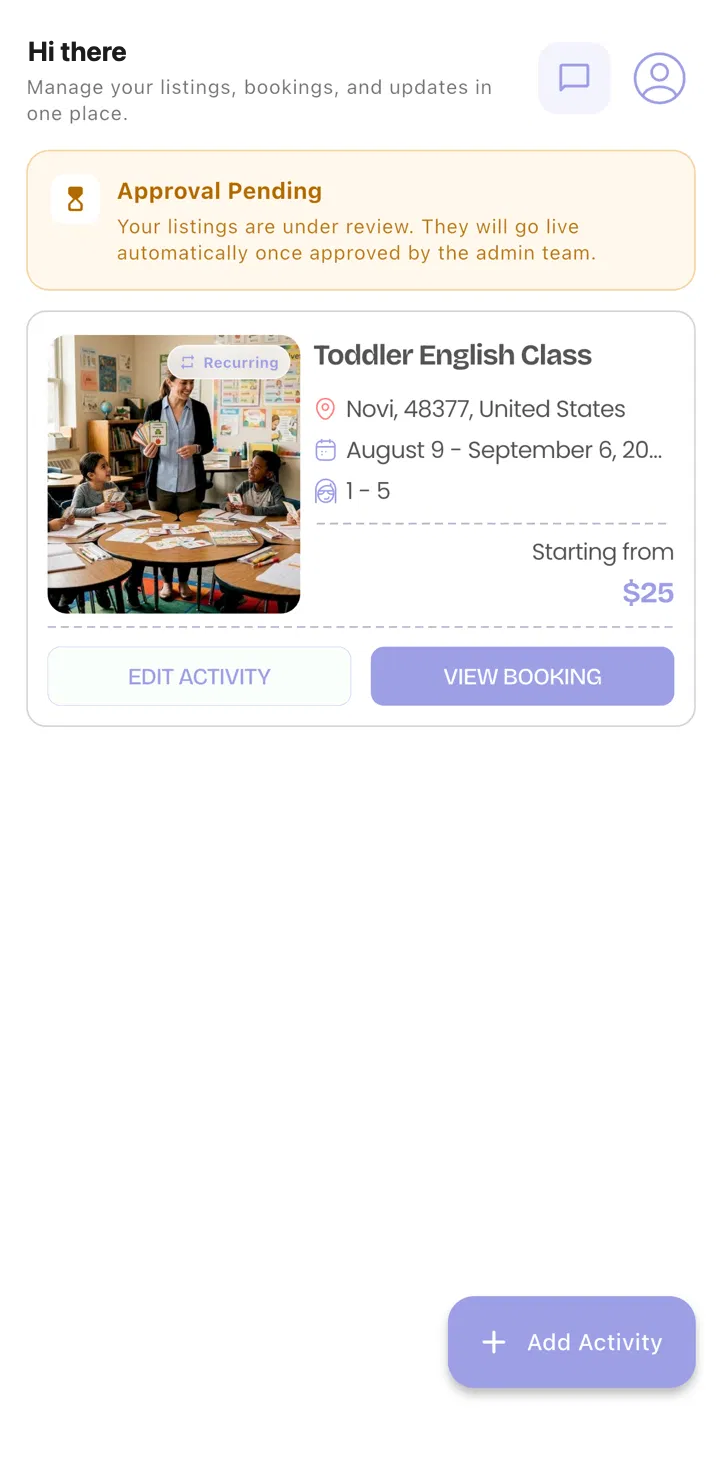
New listings show as Approval pending while our team checks them, then publish automatically. Usually same day.
Editing later
Change a time or a price and the app refreshes your schedule and enrollment plans and regenerates the affected sessions.
Broadcasts
Message everyone who has ever booked you, or just one activity's families — with reach shown before you send.
Bookings in one view
Upcoming, past and every generated session, with push alerts for anything that changes.
No manual math
Per-session rates hold automatically when you change a plan's length, so you never re-price by hand.
Ages and categories
Set eligible ages and a category once so families searching for your activity actually find it.
Same-day review
Most listings are checked and published the same day they're submitted.
You will not be handed a login and wished luck.
Switching systems mid-season is the reason most businesses never switch at all. So we do the moving part.
A 15-minute call
You tell us how your activities, terms and tuition actually work. If Junior Junction is a bad fit for your business, we'll say so on that call rather than sell you a setup.
We build your activities
Send us whatever you have — a spreadsheet, a photo of the whiteboard, a printed roster. We enter your activities, weekly slots, spots per class and enrollment plans for you.
Your listing is reviewed, then goes live
Every activity is checked by our team before it appears to parents — it's a small marketplace and we'd rather catch a wrong price than explain one. Once approved it publishes automatically, and we send you a message you can forward to your current families.
You run one term on it
Founding partners get a full year with no platform fee. If it hasn't taken work off your plate by the end of your first term, leave and take your activities, roster and payment history with you.
What owners ask on the first call.
Fifteen minutes, and an honest answer.
Tell us about your business. We'll show you the system with your own activities in it, and tell you plainly whether it's worth your time right now.
Only 8 founding seats left across two markets. When they're gone, they're gone.